How to make a short link and count the clicks on it
Ажурирано: 20. новембар 2026.
Овај чланак још није преведен на ваш језик — приказује се на енглеском.
На овој страници
Short links are created in the "Links" section: fill in "Address" and "Where it leads" and click "Create". You get your page address with a short word at the end — for example, …/sale — and every click on it is counted.
You can also give a short address to a card on your page — in the editor, in the "Short address" field.
A standalone short link
Useful when you need a link in stories, a caption under a video or on a business card, but there is no card for it on your page.
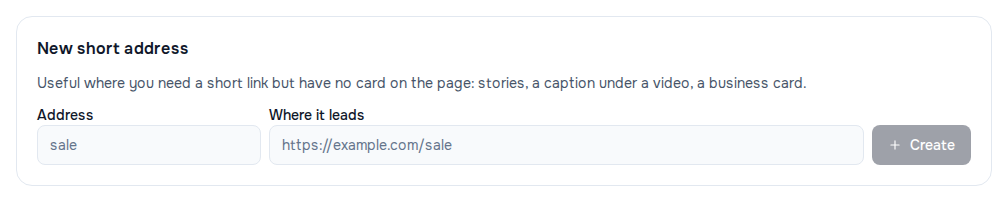
- Open "Links". If you have several pages, pick the one you need with the button showing its title.
- In the "New short address" block, fill in "Address" — a short word, for example
sale. - In "Where it leads", paste the full link, starting with
https://. - Click "Create".
The link appears in the list below: the short address, where it leads and how many clicks it has had.
A short address for a card on your page
- Open "Page" and find the "Link" card you need under "Blocks".
- Make sure the "Link" field already holds the address the card leads to.
- In the "Short address" field, type a word, for example
shop, and move to another field — the address saves itself.
The short link and its click count appear under the field, with a "Copy link" button next to it. On the published page the card leads through the short address, so taps on it are counted too. In the "Links" section such a link is marked "on the page".
To remove a card's short address, clear the word in the field and move to another field.
Which addresses work
- Latin letters, digits, hyphens and underscores; the first and last character is a letter or a digit. Capital letters become lowercase.
- No longer than 48 characters.
- The address only has to be free on your own page: another creator may have the same one.
- Some words are taken by service sections of the page, for example
contactandjoin.
Managing links
The "Links" section holds every short address of the page — standalone ones and those on cards.
- Find — the "Search by address, title or target" field.
- Filter — the "All", "Without a card", "On the page" and "Not working" buttons.
- Copy or check — the "Copy link" and "Open link" icons in the row.
- Turn off — "Turn off": the link stops leading to its target and the row shows "off". "Turn on" brings it back. If the link has expired ("expired"), "Turn on" also removes the expiry.
- Delete — the "Delete link" icon and a confirmation.
You cannot change the word or the target of an existing link on this screen: create a new one and turn the old one off.
How clicks are counted
- Every click on a short link counts, wherever the person came from: your page, stories, a chat.
- A repeat click by the same visitor within a minute counts once: a mis-tap, going back or a messenger's link preview does not inflate the number.
- Short links work while the page is published.
- If a link is turned off, deleted or expired, the person lands on your page rather than on an empty error.
If it didn't work
- "You already have this address." — the word is already used by another link or an additional page. Pick a different one.
- "This address is taken by the page itself." or "This word is used by a service section of your page." — the word is reserved; pick a different one.
- A message about which characters are allowed — the address contains non-Latin letters, spaces or other characters. The message often offers a ready alternative: "Try …" or "This one works: …".
- "This destination cannot be used: check the address." — the card's "Link" field has no full address. Enter a link that starts with
http://orhttps://and opens in a browser, then save the short address again. - "Could not create the address." — check the link in "Where it leads": it must start with
http://orhttps://. - The link leads to your page instead of where it should — the link is turned off, expired or deleted. Find it with the "Not working" filter.
- There is no "New short address" block and no "Turn off" buttons — your role on this page is "Viewer": it lets you look at links but not change them.
Да ли вам је чланак помогао?
Нисте пронашли одговор?
Наш тим за подршку ће вам помоћи — пишите нам у ћаскању.