How to move your page over from Taplink, Linktree or hoo.be
Թարմացվել է՝ 20 նոյեմբերի, 2026 թ.
Այս հոդվածը դեռ թարգմանված չէ ձեր լեզվով. ցուցադրվում է անգլերեն։
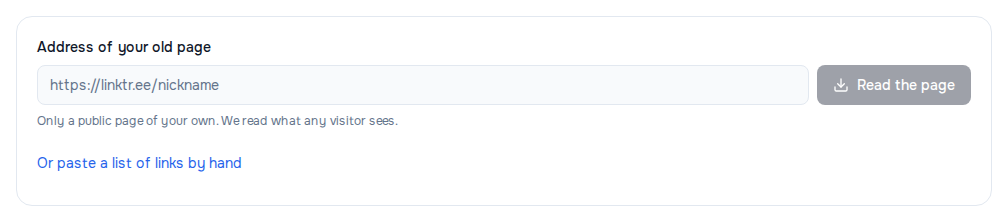
To avoid typing your links again, open "Import page" in the office menu, paste the address of your old page and click "Read the page". We will show the links we found; you remove what you don't need and click "Move to my page".
You need a page already created in WŬMÙ — see how to create a page.
Move by address
- In the office menu click "Import page".
- In the "Address of your old page" field paste the full address of your public page — including
https://, for examplehttps://linktr.ee/nickname. - Click "Read the page".
- Look at the "What we found" block: the top line says how many links and social icons were found and how many were skipped.
- Remove what you don't need with the bin button in its row. Only what is left in the list is moved.
- If you have several pages, pick the right one in the "Import into" list.
- Click "Move to my page".
You will see the message "Moved: … links and … icons". Links are added as cards at the end of your main page, social networks as icons.
We recognise Taplink, Linktree and hoo.be addresses ourselves. You can also try the address of another service — we will read the links from the page markup.
Paste a list by hand
If the page cannot be read, or fewer links were found than there really are:
- Click "Or paste a list of links by hand".
- In the "Links, one per line" field paste your links. A line like "My channel — https://…" becomes a link with a caption; a bare address works too. Lines without an address starting with
http://orhttps://are skipped. - Click "Parse the list" and continue as in steps 4–7 above.
What is moved and what is not
- Links are moved, design is not. Colours, fonts, the background and pictures of your old page stay there — build the look here, see how to fill your page.
- Recognised social networks become icons, everything else becomes link cards. If one social network has two links, the first becomes the icon and the second a card.
- The description is moved only if your page does not have one yet. What you have already written is not overwritten.
- Skipped: duplicates, the service's own links ("make one like this", sign-in, sign-up) and addresses that cannot be placed on a page.
- Statistics are not moved. Taps are counted here from zero.
- We read only the public page — the same as any visitor sees. You don't need your password for the old service, and we don't ask for it.
- One import takes up to 100 links and up to 40 icons.
If it did not work
- "The page did not respond." or "The page returned an error." — the service is down or the address has a typo. Check that the page opens in an ordinary browser, or paste the list by hand: its field opens by itself.
- "This address cannot be opened." — most often the address lacks
https://at the start: add it. If that does not help, paste the list by hand. - "The page is too large to read." — paste the list by hand.
- "No links found. Try the manual list below." or noticeably fewer links — the service's markup has changed. Paste the list by hand.
- "Too many imports in a row. Try again a bit later." — a page can be read by address 5 times an hour. The manual list has no limit.
- "Create a page first — there is nowhere to import into yet." — create a page, see how to create a page.
Հոդվածն օգնե՞ց։
Չե՞ք գտել պատասխանը
Մեր աջակցության թիմը կօգնի՝ գրեք մեզ չաթում։