How to view your page statistics
Actualizado el 20 de noviembre de 2026
Este artículo aún no está traducido a su idioma; se muestra en inglés.
En esta página
Your page statistics are in the "Statistics" section of the office menu. Pick a period — "7 days", "30 days" or "90 days" — and open the tab you need: "Overview", "Blocks", "Sales", "Now" or "Visitors".
Statistics are available in full on every plan. Only the page owner can see them.
Open the statistics
- In the office menu click "Statistics".
- If you have several pages, click the name of the one you need — the page buttons sit above the period.
- Pick a period: "7 days", "30 days" or "90 days". It applies to the "Overview", "Blocks" and "Sales" tabs.
- Open a tab.
What the "Overview" tab shows
| What | Meaning |
|---|---|
| "Views" | how many times the page was opened |
| "Taps" | how many times links with a short address were tapped (see links) |
| "Tap rate" | taps divided by views, as a percentage |
| "By day" | a bar of views for each day of the period |
| "Top links" | links with a short address, by number of taps |
| "Sources", "Devices", "Countries" | the five most common values among the period's views |
| "Engagement" | average time on page, how many read to the end, scroll depth, video and audio plays, promo code copies, requests and newsletter sign-ups, views by page |
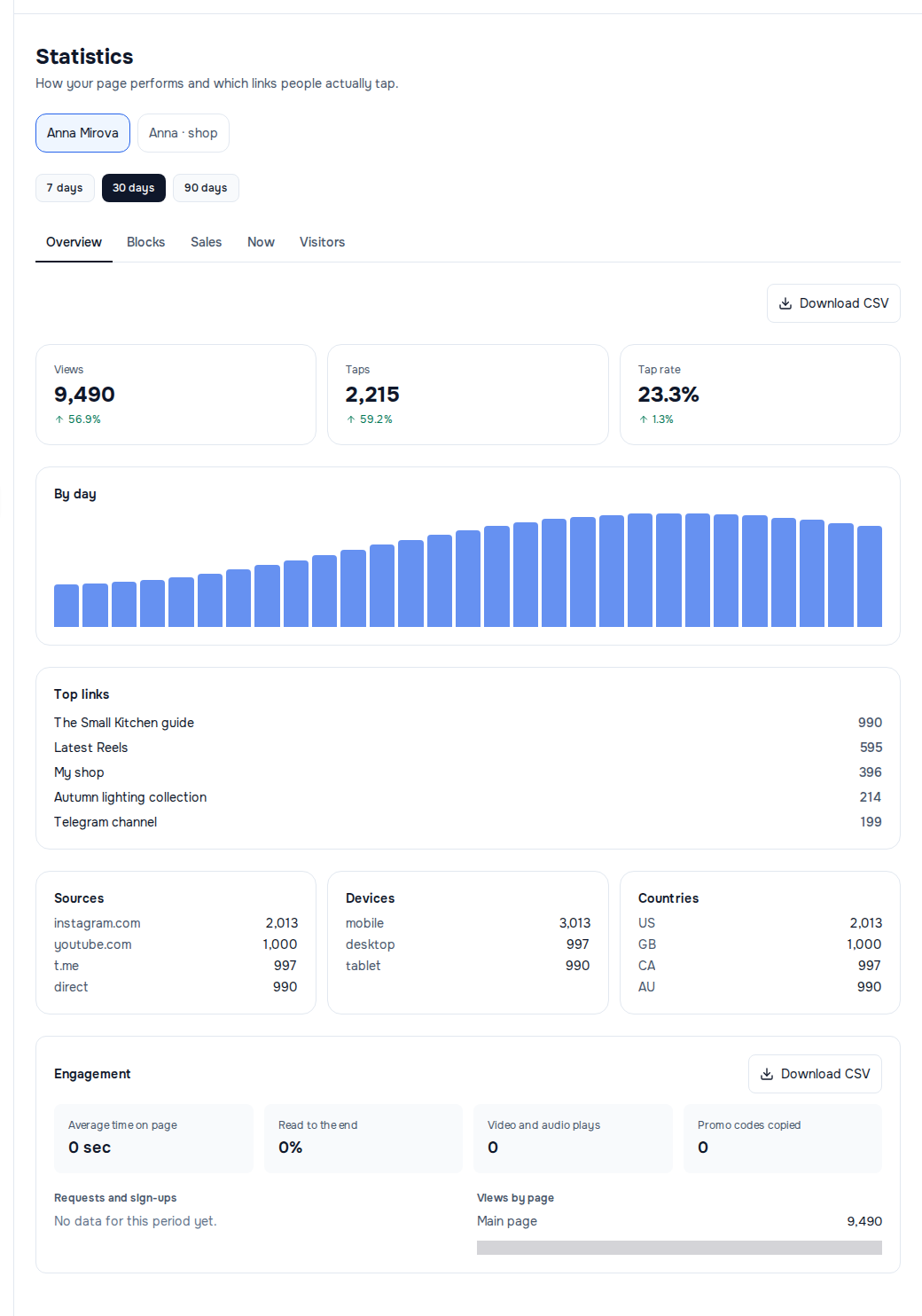
Under the three top numbers is the change against the previous period of the same length: for "30 days", against the thirty days before them. If the previous period had no views or taps, it says "Nothing to compare with yet".
The other tabs have their own articles: "Blocks", "Sales", "Now" and "Visitors". How to download the numbers is in Exporting statistics.
What to know about the numbers
- Today's views and taps are in the totals right away. The day's bar in "By day" appears after the nightly recount.
- Days are counted in Coordinated Universal Time (UTC). A late-night visit in your local time may land on the neighbouring day.
- Repeats within a minute are not counted. The same visitor viewing the same page again within a minute is one view; tapping a short link again from the same address within a minute is one tap.
- The preview in the editor does not count.
- Details are kept for six months. Breakdowns by source and device, a visitor's path and where buyers came from are available for the last 180 days; where a report starts later than the period, it says "Counted since …" underneath.
If it did not work
- "Could not load statistics." on someone else's page — statistics are shown to the owner only. If you were given access to the page, ask the owner to look at the numbers.
- "No data for this period yet." — nobody has visited the page yet, or it is not published. Publish it — see publishing.
- "No taps yet." — your links have no short address; their taps are counted only on the "Blocks" tab.
- "Create a page" instead of the section — you do not have a page yet, see how to create a page.
¿Te ayudó este artículo?
¿No encontró la respuesta?
Nuestro equipo de soporte le ayudará: escríbanos en el chat.