How to change the look of a creator page
업데이트: 2026년 11월 20일
이 문서는 아직 회원님의 언어로 번역되지 않아 영어로 표시됩니다.
The design is changed in the "Page" editor, in the "Look of the page" section. The easiest way is to pick a ready-made theme on the "Themes" tab; fine settings are on the "Advanced" tab. Changes are saved and applied at once.
Pick a theme
- Open "Page" and scroll down to the "Look of the page" section.
- On the "Themes" tab click the one you like. Themes are grouped as "Light", "Dark" and "Editorial".
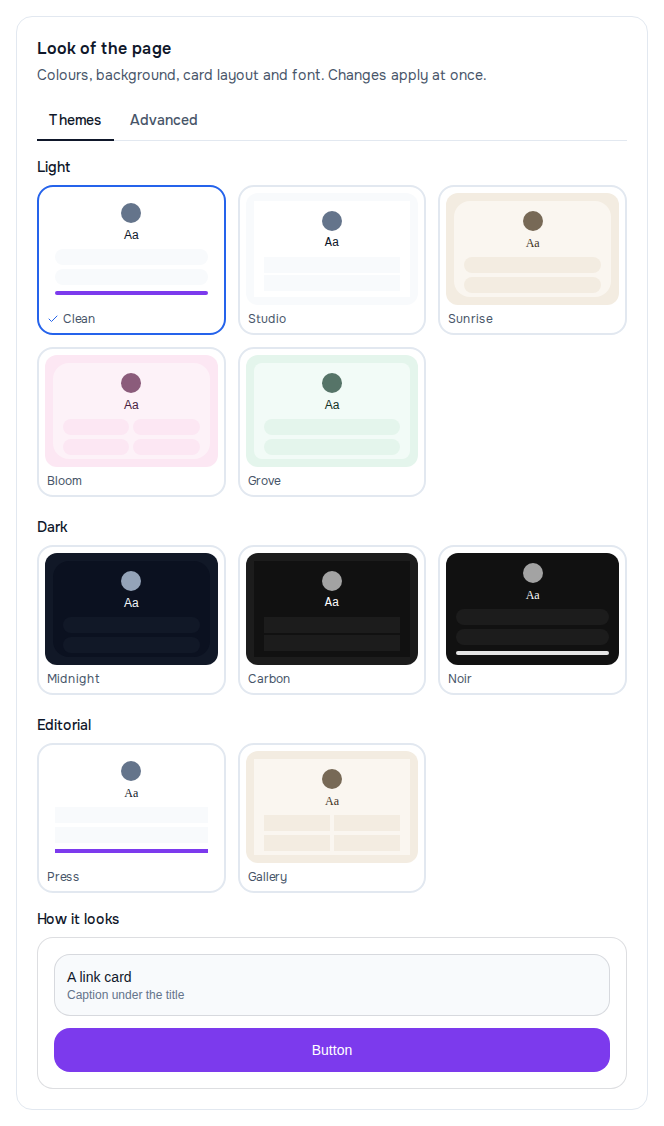
A theme changes colours, background, font and card style in one click. The chosen theme is marked. It does not touch the blocks and texts of the page.
Set it up yourself
On the "Advanced" tab:
| Setting | What it changes |
|---|---|
| "Palette" | six ready-made colour sets: background, text, cards |
| "Card layout" | "List", "Tiles" or "Compact" |
| "Corners" | card corners: "Rounded", "Soft" or "Square" |
| "Font" | system, several typefaces, serif or monospace |
| "Accent colour" | your own button colour over the palette; "Back to palette" removes it |
| "Background" | "Palette colour", "Gradient" or "Image" |
| "Field around the page" | the background around the page column |
| "Avatar shape" | "Circle", "Square", "Portrait" or "Full width" |
| "Colour of the social icons" | "From the palette" or "Platform brand colours" |
| "Link to the header video" | a video instead of the photo: plays muted and on a loop |
Under the settings is the "How it looks" sample: it changes right away, there is no need to open the page in another tab. On a wide screen the whole page is also visible to the right of the editor.
Background image
- In "Background" choose "Image".
- Paste a link into "Background image".
- Move the "Dimming" slider until the text becomes readable. Dimming goes from 0 to 80%.
Without dimming a light photo swallows the captions.
Unreadable will not be saved
If the text on the chosen background or the label on a button would be impossible to read, the setting is not saved and the previous one comes back. The editor says what to fix:
- "Text would be unreadable on this background. Pick another palette."
- "The label on the button would be unreadable. Pick a different accent colour."
If it did not work
- "Could not save the look." — check your connection and choose the setting again.
- There is no "Look of the page" section — you do not have a page yet, see How to create a page.