How to select creators from campaign applications
Uppdaterad 24 november 2026
Den här artikeln har inte översatts till ditt språk än — den visas på engelska.
På den här sidan
To go through applications, open "My campaigns", click "Applications" on the campaign card and click "Select" or "Reject" on each new application. Both decisions are final.
We do not email you about new applications — check the section yourself. The campaign card shows how many there are: "3 slots · 5 applications". The count includes invitations from the directory, even the ones creators declined.
What an application shows
- The creator's page name — a link that opens in a new tab.
- "12,400 views in 30 days" — from the page's statistics as of today, not from what the creator says.
- The creator's track record line — their past deals on WŬMÙ, see below.
- The application status, and if the creator offers a letter to their subscribers instead of a post, "Newsletter letter" next to it.
- The application text — what the creator wrote to you, if anything.
- "Placement deadline: …" — for a selected creator who has not placed anything yet. Once the deadline passes, the line becomes "Placement deadline passed: …" and is highlighted. Where the deadline comes from — deal terms.
- "Placement" — the link to the post, once the creator has attached it.
There is no email or phone of the creator in an application. Applications are listed in the order they came in: the earliest at the top.
Statuses
| Status | What it means |
|---|---|
| "New" | The creator applied or accepted your invitation. Waiting for your decision. |
| "Invited" | You invited the creator from the directory; they have not answered yet. |
| "Declined" | The creator declined the invitation. |
| "Selected" | You took the creator. |
| "Rejected" | You turned the creator down. |
| "Done" | You marked the placement as done. |
Select or reject
- Open "My campaigns" and click "Applications" on the campaign card.
- Compare the creators: views, track record, the application text. Open the creator's page from the link.
- On an application with the "New" status, click "Select" or "Reject".
The creator sees "Selected" or "Not selected" on their campaign card; no email is sent to them.
"Select" does not look at the number of slots in the campaign: keep track of it yourself.
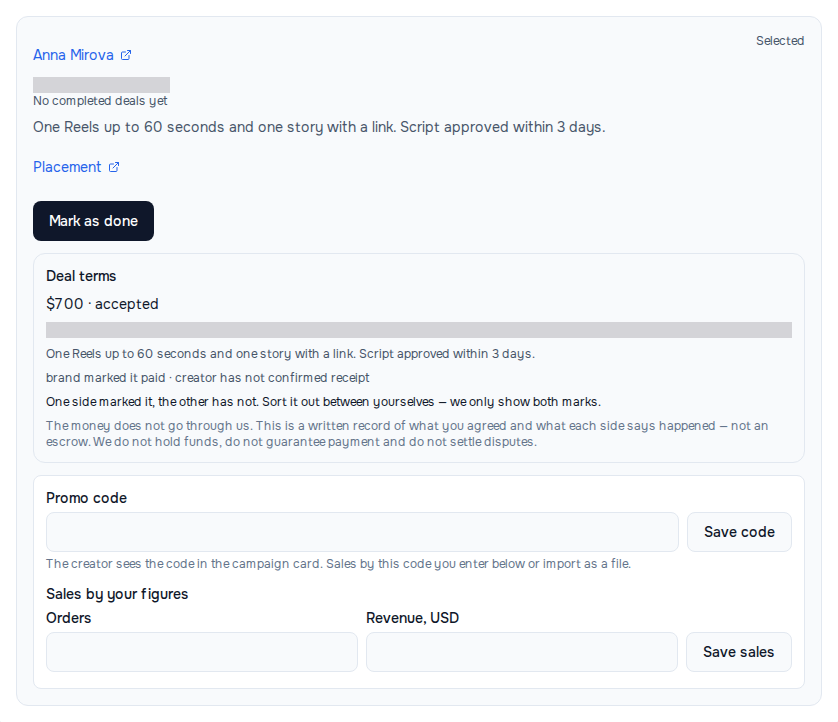
Once a creator is selected, their application gets:
- the "Draft" block, if the campaign has draft approval — how to approve a creator's draft;
- the "Deal terms" block — how to set the deal terms with a creator;
- "Promo code" and sales — promo codes and sales for a campaign;
- the "Mark as done" button — how to accept a creator's placement.
The creator's track record
A line of facts about the creator's past deals on WŬMÙ, for example "Deals completed: 8 · on time: 7 of 8 · no deadline set: 1 · latest: October 2026". There are no stars, reviews, brand names or amounts in it. The same line is on the creator's card in the directory, and creators see it about themselves.
- "Deals completed" — how many of this creator's placements brands have marked as done.
- "on time: K of M" — of the completed deals where both the deadline and the moment of placement are known, how many were placed before the deadline. The moment of placement is when the creator first attached a post link or first queued a campaign newsletter letter for sending; a second link does not move it.
- "no deadline set" — completed deals without a deadline or without a recorded moment of placement. We have been recording it since November 2026, so older deals do not have it, and M can be smaller than the number of completed deals.
- "latest" — the month of the latest completed deal.
- "past deadline, not posted" — how many of the creator's selected applications are overdue right now, across all campaigns. This is the current state: the mark goes away once the creator places the post, and also when the brand marks the application as done or closes the campaign.
A newcomer's line reads "No completed deals yet". Rejected applications do not count: the reason for a rejection may lie with the brand.
If something went wrong
- "No applications yet." — creators have not applied yet. If the campaign is a "Draft", creators do not see it — click "Publish". If the requirements are narrow, invite creators yourself, see how to find creators in the directory.
- "Could not save the change." after "Select" — the creator's page was blocked by the administration: such a creator cannot be selected, only rejected. It also happens when the decision was already made in another tab — reload the page.
- "Could not load campaigns." after "Applications" — reload the page; if it keeps happening, check your connection.
- An application has no "Select" and "Reject" buttons — its status is not "New": the invited creator has not answered or has declined, or the decision has already been made.
- You need to drop a selected creator — this cannot be done on the screen. Agree with the creator; do not mark such an application as done.
Hjälpte artikeln?
Hittade du inget svar?
Vårt supportteam hjälper dig — skriv till oss i chatten.